
When coding tutorials become outdated, you actually learn more
Learning any web development concept or tool is hardly ever theoretical. You can read and understand them as much as you think you do, but the reality is you only really learn by doing.
So watching or reading tutorials on implementing real-world projects is a perfect way to learn. Except for one problem: if you happen to be a few months late to a tutorial, it's likely already outdated.
But lately I've realized that when a tutorial is outdated and you can no longer reliably copy and paste a solution, you actually learn even more than you signed up for. It just takes a wee bit of frustration to make you mad enough to want to learn something for real.
What are outdated coding tutorials?
Tutorials, courses, how-to guides, videos - they all begin to age the moment they are created. This is especially a problem for tech tutorials, namely web development. Why is that?
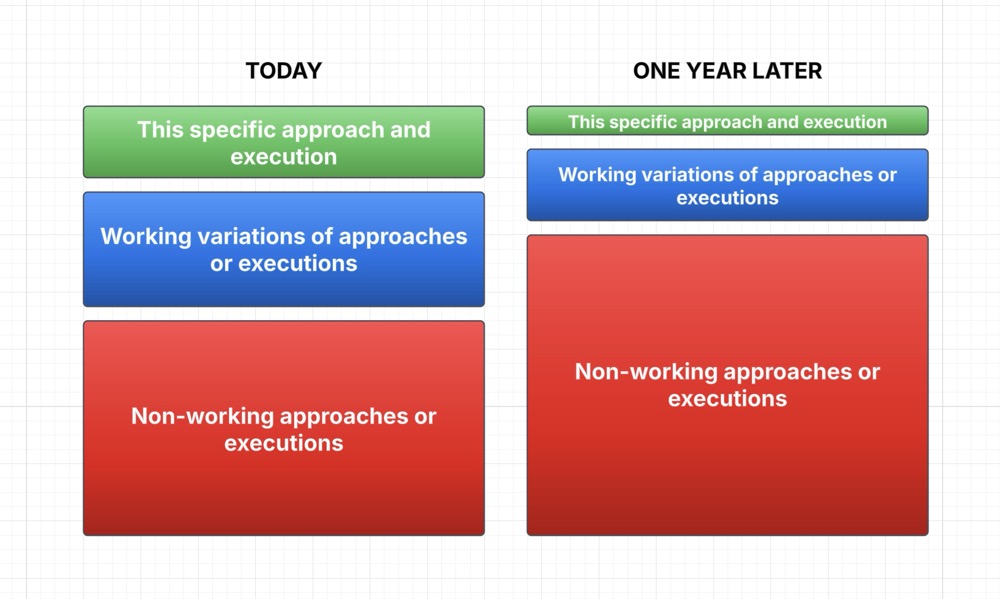
To illustrate, if you take a tutorial released this week, the demo project most likely teaches a specific approach to a problem. And there might also be some information on how to create variations of this solution without veering too far off from this specific approach. But if you want to dramatically change something, chances are this particular tutorial will no longer work.
As an example, remember when we all would download a perfect-looking Wordpress news theme, with a perfect live demo? But when you implemented it yourself, you found that if you tried to change just one little thing - increase the width of the sidebar, or add a plugin - the whole theme fell apart.

You can imagine coding tutorials are similar to Wordpress themes, where slight variations can send you spinning into rabbit holes. Except the introduction of time decay makes project-based coding lessons even more susceptible to breaking than general website themes. The older the tutorial, the less likely the specific project and approach and variations will work.
But maybe that's a good thing? Like when you are a Wordpress newb and you want to spin up a site in a day which turns into a month or two of wrestling the functions.php file. But by the end, you actually know how everything works and you're no longer a slave to the crappy theme.
Until the next round of plugin updates, that is.
UI changes
If you're learning from a tutorial that includes screenshots or instructions that demonstrate a UI, then you're in for a real visua scavenger hunt. That's because UIs change quickly and often - it's part of keeping websites fresh, updating app features, re-organizing elements, etc.
For example, if you are learning how to work with Google Cloud for something, like adding a Login with Google feature to your app, or my tutorial on how to automatically submit URLs to Google Indexing API, you'll find that Google changes and rearranges their Cloud UI frequently.
That's also the case with Microsoft Azure instructions, or pretty much any article or tip on how to navigate the Microsoft app universe. This seems to the way for mega corps, they have so many different teams and features that their official tutorials can't even keep up with UI changes.
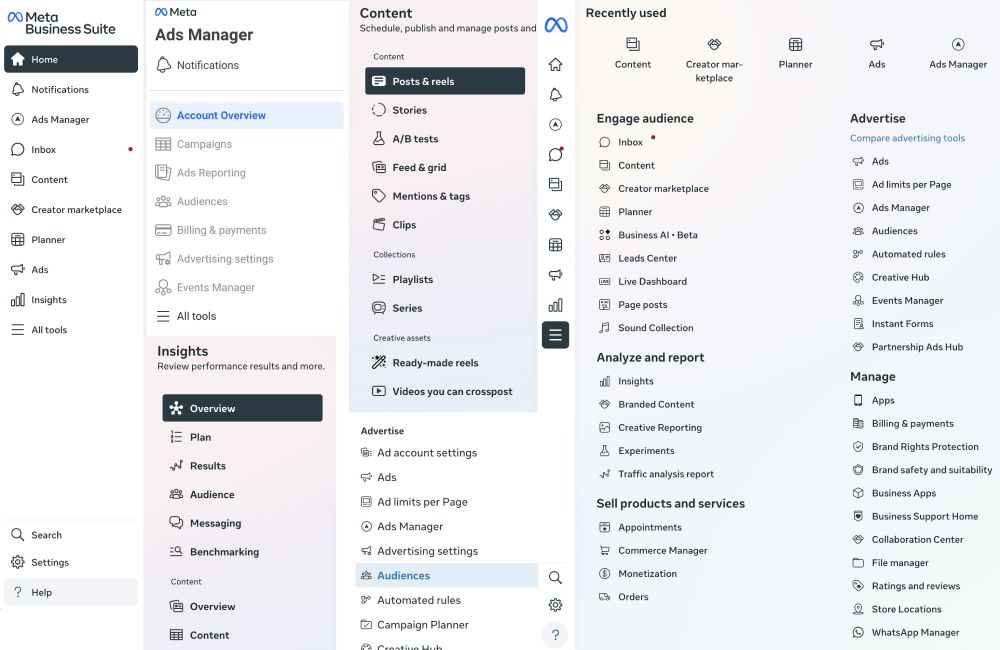
Sometimes the settings pages are moved and buried and it becomes even more of an archeological dig to find where a particular toggle is in a UI, only months after a tutorial was published.
Facebook/Meta is a perfect example of this incredibly frustrating Kafka-esque labyrinth. They move their settings to completely different pages, apps, menus, and sometimes entirely different subsites (like business.facebook.com, creators.facebook.com, ads.facebook.com, developers.facebook.com).
Custom UI settings
Another issue with UI tutorials getting outdated is when the educator has a particular custom layout that you can't replicate out of the box. That's likely because anyone who creates a guide to something is probably an experienced user who has loaded their instance with all sorts of add-ons that aren't in the default interface.
If you're learning a CMS like Sanity, for example, the tutorial might be working with a particular version of Sanity Studio with custom components and add-ons at a specific point in time. So even if they don't intend to misguide you, the educator may not realize that by the time you are watching the tutorial, you are no longer seeing the same screen and can't follow along as confidently.
And of course there are is a constant train of OS updates, browser updates, hardware, software, peripherals - you name it - that can affect where elements are found in the user interface.
Code frameworks and packages
On the code side, you're less likely to experience instantly outdated tutorials than UI-based tutorials, because you're working with more stable tools and instruments than the ever-shifting GUI. For example, the basic method of writing text in an IDE or a text editor isn't changing month to month.
But there are many things that do change. Let's take this example: you are learning Next-Auth.js.

The package name changes
If the package name changes, you need to install and import a different package than the tutorial specifies. This is the case with NextAuth.js, which has evolved into Auth.js.
So where the tutorial might say to import NextAuth from "next-auth", you'll now need to update it to import { auth } from "@/auth", but meanwhile the package itself is still "next-auth".
The built-in methods change
Most likely there are some changes to available methods as a package is developed over time, which means the precise steps for how to implement something is no longer accurate.
For example, where you might be instructed to use getServerSession() in an older tutorial, by the time you watch it and use a new version of the package, you'll want to switch to auth() as in const session = await auth().
Framework updates no longer support the package
If you're using Next.js, for example, you may be on a completely different version of it, as well as React, than the tutorial you are following. And your new framework updates might have rendered the tutorial's packages outdated.
Dependencies no longer work
Sometimes all it takes is one of the many dependencies in a package to be out of date for a mystery error to bubble up in your project as you're following a slightly outdated tutorial.
Web standards and recommendations have changed
Finally, even if the tutorial is still technically working, there might be security issues or browser standards that have made the tutorial outdated. Not that it doesn't work, it's just no longer recommended to follow this specific approach.
In the case of Auth.js, it's now a part of Better Auth, which means there may be better APIs and implementation recommendations sooner than later as the Better Auth team keeps up to date with security and web standards.
Why outdated coding tutorials actually help you learn
So now that you're facing a multitude of reasons why your project-based coding tutorial is outdated, what do you do?
It used to frustrate me to no end when I couldn't even replicate the project in the tutorial, but I've learned to actually enjoy an outdated coding tutorial. Yes, it does take longer than you may anticipate to complete the project, but along the way you learn so much more.
You're forced to read the docs
The best place to learn any new tool or framework or package is in the docs. Yes, it can be overwhelming when you're completely new to something, but you start to learn the habits of a good developer.
A tutorial or tip or even an AI response is always an interpretation of how to implement a piece of code in your project. Going to the docs means you're always going to the source, which usually has the most up to date recommendations for implementation.
You can always copy and paste the docs into a chat with Claude and ask for help.
You learn how something works, not just how to implement one approach
When you face a broken project that you're learning from a tutorial, you have no choice but to figure out how to make it work. And by doing that, you start to learn how to stretch it, change it, and break it in way more ways than the tutorial can teach you.
In the above example with Auth.js, if you're simply following along a tutorial and everything works out of the box, you've learned how to implement a specific method. But if you have to learn about sessions and login providers on your own - in order to make the tutorial work - you'll get insight into why this approach works, why it's different than other tools, and why you might choose to execute in a completely different way.
You learn your own preferences
Which takes us to the final and best reason why an outdated coding tutorial is actually really good for you. You start to make your own decisions about your preferences, whether you like an opinionated framework or if you prefer to have more control, whether you prefer to code for one specific implementation or build yourself options for changes down the road.
And that makes you a much more confident developer or product maker. When you know not only how a tech stack works but why you like to use it for this problem, versus other solutions for other problems, then you truly build a mastery that extends well beyond the tutorial.
So the next time you face an outdated coding tutorial, roll up your sleeves and get ready to learn more than you bargained for.