
Autoblogging With Claude Code: A DIY AI Blog Pipeline That Isn't Slop
At the risk of adding to the giant pile of AI slop that is filling up the web and burning through our planet's energy, I have created a pretty good AI autoblogging system that uses a Claude subscription, rather than an automation flow with API tokens.
But hold on, before you throw me into the slop pit, hear me out.
I really love blogs. Writing is as essential to my survival as eating sandwiches, and reading blogs is where I get most of my inspiration and knowledge.
During the last 25 years I've written over 1 million words for various sites, or about 20 books worth. Sometimes for other publications, but often for my own websites. And in that time I've probably read 10x that in other blogs.
So why do this? Why contribute to AI blog writing slop?
Blog content is essential but not as essential as the product or service
If you want any chance of organic traffic to your business, or SaaS, or indiepreneur side hustle, or whatever you put out into the world in the hopes that someone will buy it... you need a lot of content.
I don't make the SEO rules, and the rules are changing with GEO/AIO (Generative Engine Optimization / Artificial Intelligence Optimization), but when it comes down to it a new website has always and will continue to need a lot of blog content to rank. There is no way around it, at least not legitimately.
Some of these blog posts are read by real humans, but many are simply there to feed the search engine beast. So if you're a builder or a business person, are you really going to spend your time writing the 1000th blog post on teeth cavities or app comparisons? Instead of building your product or providing your service?
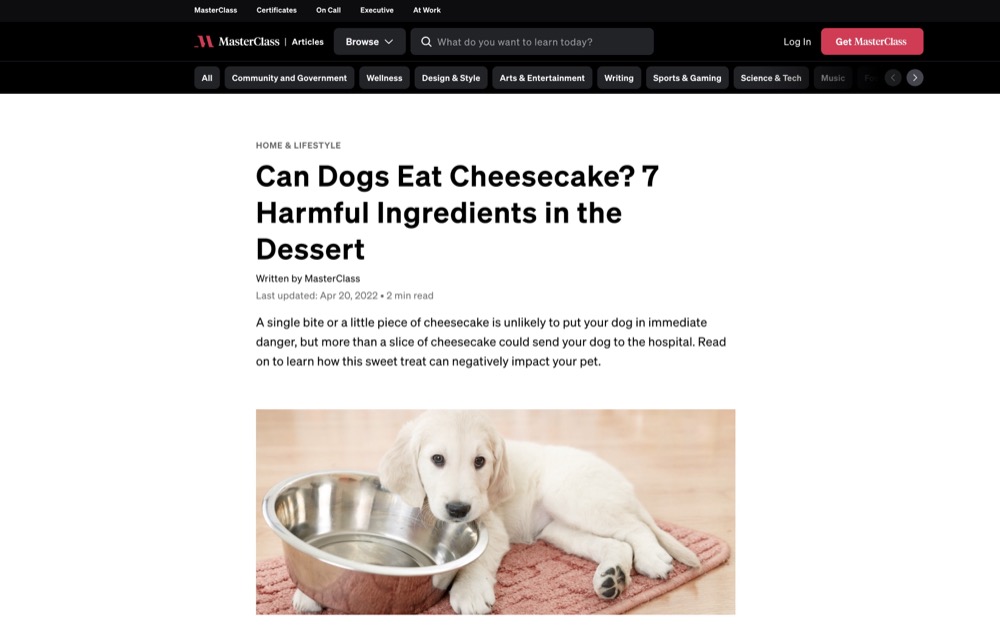
Masterclass.com, for example, publishes 350 blog posts a month, which adds up to over 30,000 articles since they began their blog-driven SEO strategy. They are valued at $2.8 billion, and their products are video courses taught by the world's most famous people. And yet, even Masterclass has to play the blogging game.
So yes, when your project takes off and you can afford it, or when you get that Masterclass money, you should definitely hire professional writers and illustrators to make good blog content. As well as support and documentation and everything that serves potential and current customers. Or maybe you'll finally have the time to craft the blog content yourself.
But when you're just starting out, or you're a small business, it's hard to justify feeding the Google beast when you have more important work to do.
Quality vs AI Slop

Look, if we're going to do this, we need to make the content actually good. So if there is a human at the end of the line, our blog posts are helping them for real, rather than wasting precious human time and data center energy to feed the Google beast.
Google has also made it clear that they don't necessarily care how content is created, as long as it's useful to people. How do they know it's useful to people and not AI Slop? They won't tell you, but I guess if you and I can smell it, then certainly Google's algorithm can smell it. And since their AI labs create the LLMs that generate the slop, they probably know the ingredients.
I learned this lesson a couple years ago, a few months after the start of the AI mania, when everyone proclaimed traditional blogging was dead. Jasper and other AI blog writers were all the rage, but I wanted long-form articles because I knew that was important for cornerstone blog content.
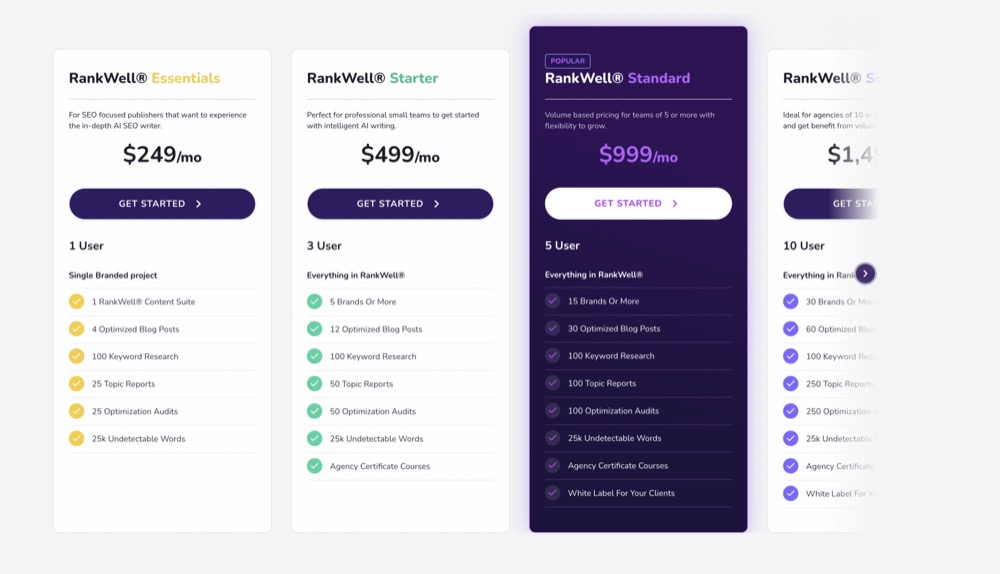
So I tried a service called Content at Scale (now Brandwell), which uniquely offered long-form AI writing. It cost $249/month to start, for a handful of articles. They used a combination of LLMs, along with intregration into Wordpress, pretty good on-page SEO with external links, keyword integration, and a humanizer to avoid automatic AI detection. So it was definitely better than manually copying and pasting and rewriting bad ChatGPT articles.
But Content at Scale was super expensive, so after that short experiment I assembled a few Wordpress scraping and AI writing plugins and I set them to work on an old tech website I had. Within months I had thousands of lousy articles that were horrible for humans to read. And wouldn't you know it, Google agreed. So after an initial spike in traffic, Google must have smelled the AI stench and gave me the old shadow ban hammer.
Autoblogging services don't give you the best research, writing, or images
Fast forward a couple years and there's now a ton more tools to do your autoblogging for you, like Frizerly, SEOBot, Rytr, and many, many more. I'm sure they're ok, but after my initial experience with AI blogging, I just don't trust these services to generate anything but slop. They're not going to dedicate a million quality LLM tokens to produce a good article for you. It would be bad business.
There's also the keyword and content research part of blogging, which is important to get right. If you've tried to use Google Ads to do free keyword research, you know how much of a time suck it is. Paid services like SEMRush and Ahrefs can help, but they still require your hand holding. And the autoblogging services mentioned will not go much deeper than the main keywords and topics - not the long tail good stuff.
And then there's the content research itself, before writing. That part can be done by just about any AI chatbot, but the subscription autoblogging services are not going to dedicate a lot of tokens to doing your in-depth research.

And then of course the images. Images break up long blog content, but they're also supremely time consuming to create or source, especially images that enhance the blog's message.
AI image generation seems like it could solve that issue, but it can't be an after thought. The stench of AI generated images makes autoblogging a risky proposition if you're trying to build organic traffic and trust. But recently Google came out with Nano Banana Pro, and suddenly good blog images are actually attainable, quickly and cheaply. I'll tell you about that in a minute.
So to get all the pieces working in a way that consistently makes good content would take a really good automation flow, and it's certainly possible with N8N. I've admired a few flows shared on the N8N subreddit, large masterpieces of connected APIs and AI agent nodes that propose to do it all.
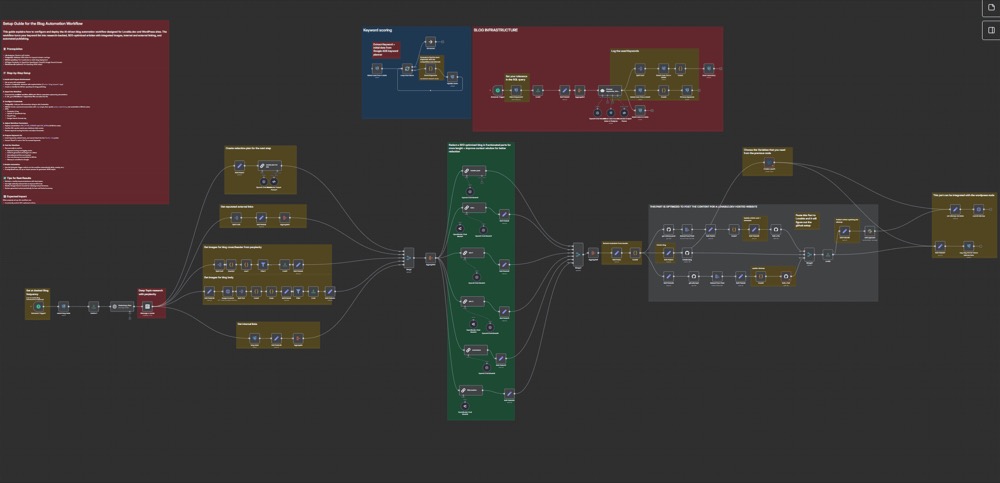
But the problem with all the N8N flows is that they require paying for AI analysis and content generation with API tokens, which can add up quickly. I've tried a few different ways to install Claude Code deep within a self-hosted N8N virtual environment, but it's very flakey and you can't actually see what it's doing, or know why it's stalled.
Automation flows also require rigid, robotic structures and rules, even with AI agents in the middle of them. Overall I just haven't been able to figure out how to coordinate everything in a way that keeps things loose and flexible, like a human.
But earlier this year when Claude Code became really good - starting with Opus 4.5 - magical big picture scenarios became suddenly possible. Could Claude Code orchestrate and glue together all of these autoblogging requirements together?
How the Claude Code autoblogging pipeline works
Instead of an elaborate N8N flow that uses API tokens, instead of a home-made app, instead of assembling various free or paid tools, with this autoblogging system, Claude Code handles everything.
Here is a summary of how it works:
☑ Claude Code does some initial research based on your existing site content.
☑ Claude then connects to DataforSEO to get keywords and topics that have search volume with reasonable competition.
☑ Claude fills out a Google Sheet with a list of keywords and topics, and proceeds to move down the list.
☑ Claude generates the article, using a writing style that tries to be human. It's really good, but it smells of AI and fails the detectors.
☐ (Optional) So Claude then calls up Walter Writes, generates a humanized version of the article, and then reviews it and makes small changes to overcome the stench of the humanizer.
☑ Claude then asks Google Nano Banana Pro to generate cute images based on sections of the article, using some example images as a style guide, and then places the images in relevant parts of the article.
☑ Claude formats everything to SEO spec, with internal and external links and a brief FAQ, creates the full markdown file and places the article and images in the right folders.
☐ (Optional) Finally, Claude emails out the blog and images for approval. You can reply with suggested changes, or you can approve. This is done with a local node app that runs on your computer, polling your email inbox.
☐ (Optional) If you reply with
Approve, Claude will then commit and push the article the next time you run the autoblog pipeline. If you reply with suggested changes, Claude will pick them up, make the changes, and send out a new approval email.
And it's all done with a Claude Code monthly plan and Google Nano Banana Pro for images. No N8N automation flows. Just your Claude subscription, about $1 per post for the images, and some extra costs for the keyword research and the humanizing.
Want to see the output for yourself? This article on AI for product development was researched, written, and illustrated by the pipeline, start to finish.
How to install this autoblogging system
The beauty of this workflow is it's entirely run by Claude Code, so all you need to do is copy the repo into your main website folder, and tell Claude to run the autoblog pipeline. It will read SETUP-NEW-SITE.md and get started.
I've done this with a number of websites now, and each time Claude will opt to make some changes based on your existing site structure, content, and custom desires.
There are some requirements, however, including a DataForSEO account with some paid credits, a Google Sheet, a Google Cloud account with billing for Nano Banana images, and optionally a Walter Writes account for humanization.
You can ask Claude what each of the npm packages are for.
Keyword Research with DataForSEO
There's no point in autoblogging if your articles don't target specific keywords that have volume and low to medium competition. But how do you find those keywords?
Back in the day, I used LongTailPro for all my sites. It was amazing, but unfortunately it was discontinued. So much for my lifetime plan. Now you can either use Google trends, or keyword research via Google Ads, or pay for SEMRush or any number of other SEO tools. But all of those are time intensive and you have to know what you're looking for.
DataForSEO does this perfectly well, and via API. You have to seed it with $50, but with this autoblogging flow you will probably be good for a year. You'll then just have to add your DataForSEO login/pass into your .env so Claude can connect to it.
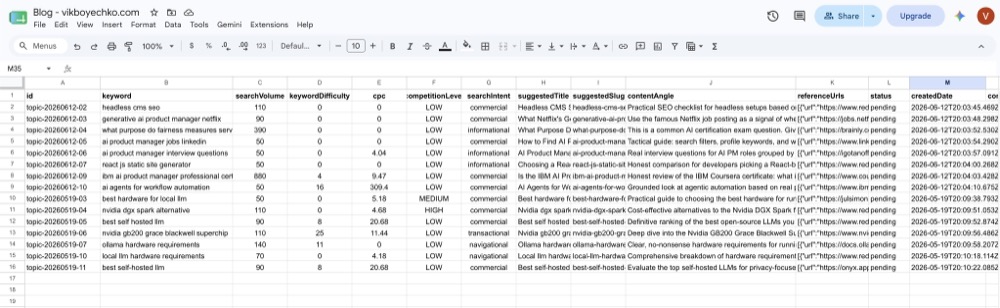
So not only will your blog posts target specific keywords, you can also use the DataForSEO research to help with on-page SEO, like the headings, meta description, and FAQ topics.
That is also helpful if you still want to manually write some blog posts, but you want to use DataForSEO to help target what people are searching for, both in search engines and in AI chatbots.
Google Sheet for Planning and Review
Although a Google Sheet isn't strictly necessary - you could certainly just generate some local JSON or CSV files, I find it helpful to look at a list of article topics and descriptions that are coming up and that have been completed.
To get this part to work, you'll need a Google Cloud account, create a new project, activate the Google Sheets API, and generate a JSON file that you'll place in the /autoblogging folder. Just ask Claude for help on how to do this.
Finally you'll need to create the sheet, create a Queue and Completed tab in the sheet, and then copy/paste the sheet ID (which is in the URL) into your .env.
You'll then need to share the sheet with the email address of the Google Cloud service account that you created, so Claude can read and write to the sheet.
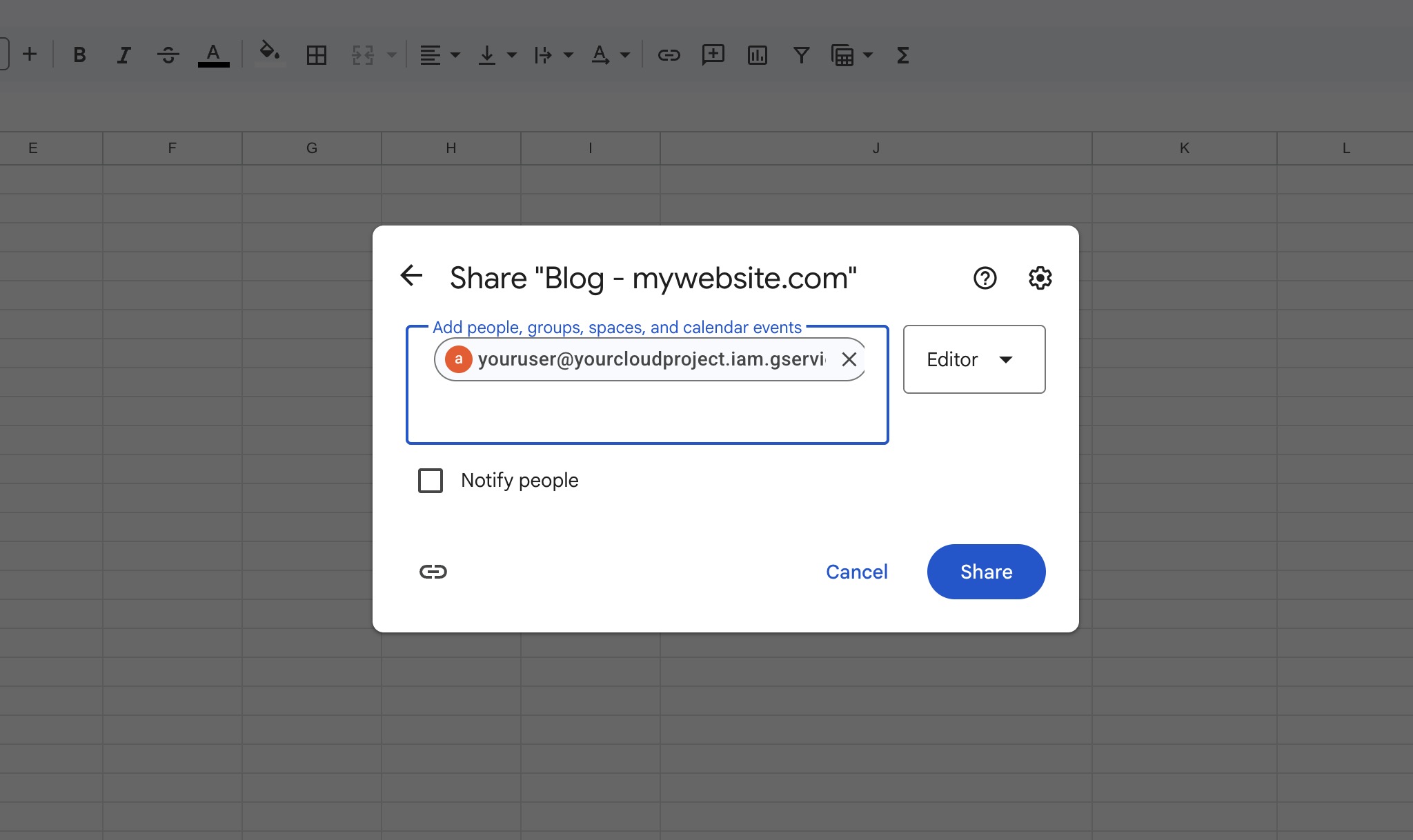
Now anytime a blog post is generated, it will automatically move from Queue to Completed. And when the Queue list is empty, Claude will kick off another round of research.
Google Nano Banana Pro for Article Images
Images are way more difficult to pull off than AI-generated articles. There are so many trust signals in images, and the slightest whiff of AI will make any article lose credibility.
So for this autoblog pipeline, I have gone with abstract imagery in the style of magazine editorial illustrations. I've tested this out on different sites, with changes in prompts and example images, and it reliably sticks to a style guide. There's some instruction to vary up the background colors so they're not all exactly the same.

The pipeline feeds your example images and chunks of your article into Nano Banana Pro. After a few seconds, the images are generated and Claude will then place the images into the article. It will also fill out the image alts, place an image in the article frontmatter, and in general ensure all is good.
And finally the pipeline will convert the Gemini-generated large .PNG files into .JPG and downscale to 1000px wide. But you can customize this to whatever size and format you'd like.
Example images and consistent style
If you want a consistent style - and you don't like the editorial illustration look - setting this up is really easy. Change the example images and image prompt, and Nano Banana will take care of the rest.
But what if you don't have example images? I've done this recently with a tech site where I wanted to create a unique, consistent style for educational tech articles. So I worked with Claude on creating a bunch of examples with Nano Banana, with color palettes and variations. Once we had it locked down, I simply used those new example images and Claude figured out the best way to prompt Nano Banana.

Walter Writes for Humanization
Humanization is up for debate. Honestly, I don't know if it's necessary or worth it. I don't know if Google cares if an article fails an AI detector. But there will likely be all sorts of browser and third party tools to flag AI written content, so why not give your articles a chance from the get go?
So for now, I've decided to go with humanization. And in my opinion, Walter Writes is the best humanizer out there, after experimenting with a lot of different humanizers.
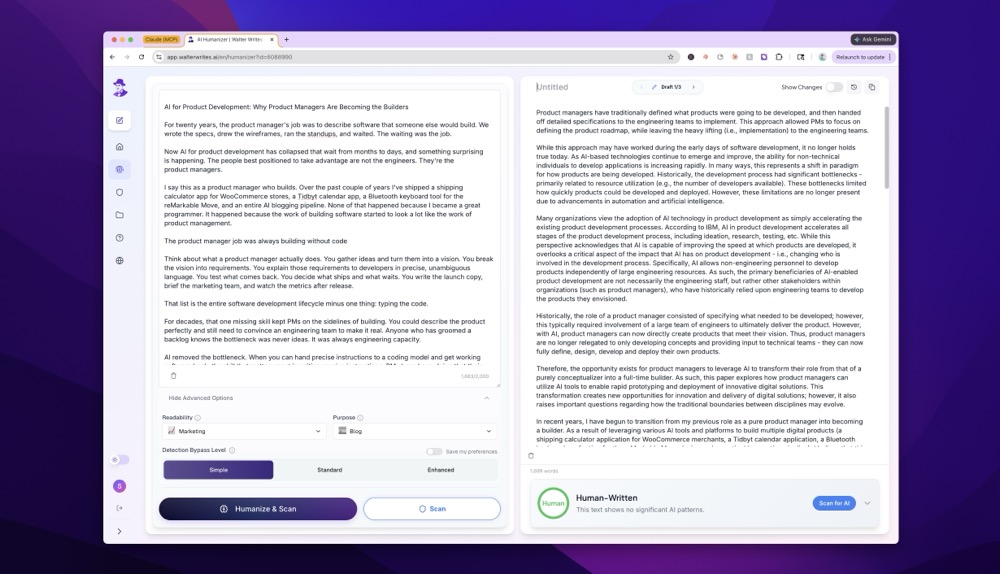
What a humanizer does is basically mess up your article. It makes the sentences shorter, uglier, and overall less "perfect." Walter Writes actually has a few different output settings, from Basic, to Advanced, to Enhanced, and it also has different styles including Blog, Academic, etc.
I'm just using the Basic Blog setting, as it seems to do the least damage to the original article, while still passing the AI detector. But this could always change as the tools get better at both detecting and humanizing.
Quality Assurance after Humanization
So the basic flow is after the article topic is selected, Claude will do some research and generate an article. First it follows some basic suggestions in writing-style.md. These are tips I've collected over the last year from different suggestions on Reddit, X, and blogs. Things like avoid em dashes, generate internal and external links, include a FAQ, etc.
Once the article is written, Claude will then connect to Walter Writes via MCP. For long articles that are over the Walter Writes limits per article (which differs per subscription), Claude will separate the article into multiple pieces and then stitch them back together afterwards. You'll still need to watch your monthly word limits.
Now once the humanized article is complete, Claude is instructed to go through it and fix all the horrible mistakes as a result of humanization. Claude will often complain to you about how terrible the humanized article is - maybe it's a bit upset that you're desecrating its original brilliant writing.

But by the end, you'll have an article that is somewhere in between - not completely Claude generated, not completely humanized junk - somewhere in the middle.
Walter Writes via MCP is new and way better than having to copy/paste text into a browser window, so this makes the pipeline a lot smoother. They also have an API coming soon, which will make it even better. Here's more details on how to setup Walter Writes with MCP.
Humanization without Walter Writes
If you want to skip Walter Writes, I completely understand. The output is often not very reader friendly, even though it does pass the AI detectors. However, I still recommend a humanization tool that takes Claude's output to the next level.
For that, I recommend the Slopbuster repo. It's completely free and easily integrates into your pipeline. The articles are much more reader-friendly, but they probably won't pass AI detectors if that's what you're after.
But maybe there's hope yet! For the demo article I created for this blog post, I used the brand new Claude Fable model and Slopbuster, and it actually passed the AI Detector without requiring Walter Writes. So maybe the newest Claude model along with Slop Buster is the way to go?
No matter what you do, the most important thing is the article has to be good, and it has to have real information. Don't publish anything that's not true.
The Article Review
Finally we get to the article review part of the pipeline. This is completely optional, and if you're a solo dev you can just run your website locally and preview the output before publishing.
But if you plan to have someone else review the articles, or if you want to try to automate some of this flow (see the Automation section below), this part of the autoblog workflow is ready to go.
How it works is it sends a fully rendered version of the article with images to an email address of your choice, and then it runs a little Node script on PM2, polling an email inbox for a message that begins with [Autoblog] or [Blog Review] or whatever you'd like to call it. If you reply 'approve' to the message, the pipeline is complete and the article is ready to be published.

If you reply with feedback, the script will kick off a new Claude Code session, complete the changes, and send another email for review.
Before the recent Claude changes, the approval and feedback flows would be separate automated Claude sessions. But now, it's rolled into the main pipeline. So when you run the pipeline with Claude, if there is an article that's been approved and waiting to be published, or if there's been some suggested changes, Claude will read those notes from the Google Sheet and take care of that article first, before moving on to generate a new one.
It's not as durable as an N8N flow, but it's a lot simpler to create, modify, and contain it all under Claude Code terminal sessions.
If you're not familiar with PM2, it's a process manager for Node apps that allows you to run scripts in the background on your computer, and it also has a nice CLI dashboard to monitor the processes. So you can easily see if the email polling script is running, and you can check the logs to see if there are any new messages or if there were any errors.

Is this really automated blogging?
You do need to be careful not to break the Terms of Service for your Claude subscription. For example, in a previous version of the review workflow, if the article was approved, Claude would spawn a new session with the -p flag and go ahead and commit and push the article to your repo.
Well it turns out this is something Anthropic definitely does not want you to do. They do not want a Claude subscription being used in any automatated flow. It's meant for a single person who is prompting Claude in real time. And now they've even removed the ability to spawn -p sessions unless you're paying with API tokens.
So I would personally avoid trying to completely automate blog creation via a Claude Code subscription.
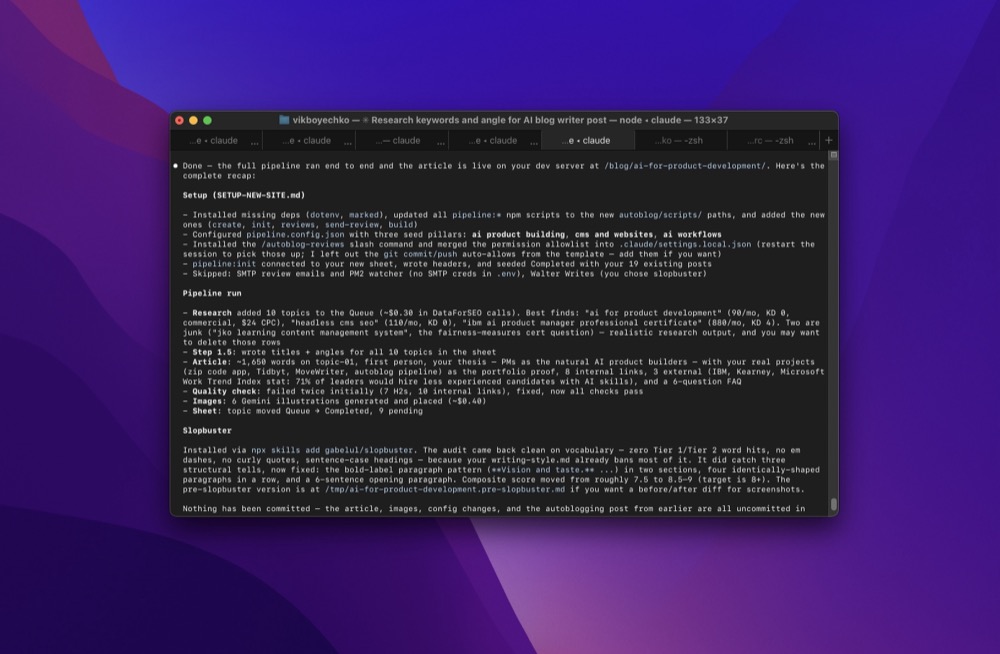
But of course there are many ways to automate a script running in terminal, so that's up to you and your level of comfort. Claude also has built-in scheduling tools inside the desktop app, and that might be the way to go, or you can use cron or Lingon Pro or an OpenClaw/Hermes agent, you name it.
For me it's perfectly acceptable to open up a folder in terminal, load up Claude Code, and ask it to start a new article using our autoblog pipeline. And then I can monitor it as it goes.
Updates and Customizations
The great thing about this pipeline is it's a series of .MD files, so you can ask your Claude to customize it however you'd like.
In the past few months of using this flow, I've made a number of changes and customizations to different sites. The Nano Banana Pro model changed to Nano Banana 2, which is much cheaper but just as good, I've customized the image instructions, I've changed the research strategy, the QA.
Sometimes Claude has even suggested changes to improve the workflow, which is great. Other times Claude has failed miserably at some point, and that's to be expected.
But overall I'm happy with this autoblogging pipeline, and maybe it'll be useful to you too.
In the next chapter of this story, I'll be taking this pipeline completely offline and running it locally on a home AI server, using Pi and local LLMs for the article, and a fine-tuned vision model for the images. But first I'll need at least a few months of trial and error to make sure it works well.
The whole pipeline is open source. Grab it at github.com/vikboyechko/autoblog, drop it into your site folder, and tell Claude Code to run the setup. If you build something with it, I'd love to hear how it goes.